
Tools · iOS
Divux: Productivity All In One
by Vic Vea


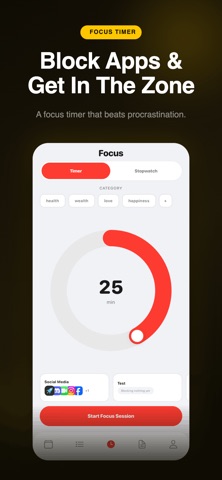

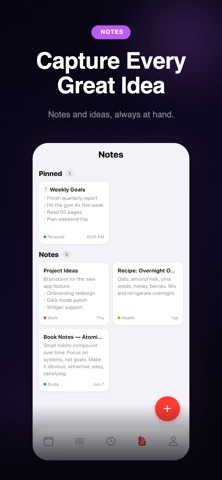

Divux bundles calendar sync, task and habit tracking, a focus timer, quick notes, and productivity statistics into a tidy 42 MB install. Solo developer Vic Vea shipped version 1.2 within a week of the June 2026 launch, signaling active iteration. No user ratings exist yet, so this review rests entirely on observable features, app-store data, and category norms rather than any community track record.
Impressive feature consolidation, execution depth unproven
The feature breadth here is legitimately impressive for a free, solo-built app. Calendar sync, habit tracking, a focus timer with stopwatch mode, quick notes, and usage statistics all live under one roof, covering the core pillars most productivity seekers would otherwise spread across three or four separate downloads. Customizable accent colors and selectable UI styles add a layer of personalization that feels considered rather than cosmetic. Nothing on the list is a category invention, but thoughtful consolidation has real practical value. The central question is execution depth: whether calendar sync reaches beyond basic display, whether habit streaks survive edge cases, and whether the statistics surface genuinely useful patterns rather than vanity numbers. Those answers require sustained daily use that the app's age simply has not yet allowed.
Lightweight build signals thoughtful engineering, stability untested
At 42 MB, Divux sits well within the lightweight range for a multi-feature productivity app, suggesting the developer has avoided bloating the bundle with heavy frameworks or redundant assets. Version 1.2 arriving within a week of the June 19 launch points to a developer who responds quickly to early feedback, which is a positive signal for stability trajectory. That said, zero ratings from zero reviewers means there is no crowd-sourced evidence about crashes, sync failures, or battery behavior. Performance assessments for apps this new are necessarily speculative. Expect the experience of an early-stage product: mostly functional, occasionally rough around edges that only real-world use uncovers. Anyone running Divux as a primary productivity tool right now is, in practical terms, participating in extended beta testing.
Free now, future pricing structure unclear
The app is free to download, which removes the financial barrier to trying it. The risk, however, is not monetary but habitual: building a daily workflow around a tool that may introduce paywalls later or stall in development is a real cost. The App Store listing notes the potential for in-app purchases, yet the scope remains completely unspecified. Core features could stay free indefinitely, or a future update could move habits or statistics behind a subscription. Until that pricing structure becomes clear, committing deeply to Divux carries meaningful uncertainty. For casual or experimental use, free is an easy yes. For anyone considering it as a long-term productivity hub, the value equation depends on answers that do not yet exist.
Calendar access requires careful privacy label review
Calendar sync by definition requires access to sensitive personal schedule data, and a focus timer or habit tracker may request notification permissions. The App Store privacy nutrition label for Divux is the authoritative source for exactly what data is collected, how it is linked to your identity, and whether any of it is shared with third parties. We strongly recommend reviewing that label before granting calendar access. Solo developers operating without a dedicated privacy team can sometimes underestimate data-handling obligations, so checking whether a privacy policy URL is present and whether it addresses calendar and usage data specifically is a worthwhile step before onboarding personal schedule information.
Design intentionality evident, accessibility support unverified
The inclusion of customizable accent colors and multiple UI styles suggests Vic Vea has thought about visual personalization beyond a default template, which is a meaningful indicator of design intentionality for a version 1.2 product. A content rating of 4-plus means Apple found nothing objectionable in the experience, consistent with a clean, general-audience productivity tool. Formal accessibility qualities, such as Dynamic Type support, VoiceOver compatibility, and sufficient color contrast ratios, are not verifiable from store data alone. Users who rely on assistive technologies should test the app directly before committing, as accessibility implementation in early-stage solo projects varies widely and is rarely documented in initial release notes.
Strong early momentum, long-term pace uncertain
The version history tells an encouraging story in miniature: released June 19, updated to version 1.2 by June 26, a seven-day turnaround that suggests the developer is monitoring feedback and shipping fixes promptly. That cadence is genuinely positive for an app this young. The concern is sustainability over a longer horizon. A solo developer balancing multiple responsibilities may maintain that pace through an initial burst of enthusiasm and then slow considerably. No public roadmap, no community forum, and no support channel details are visible from the store listing, which makes it difficult to gauge long-term commitment. Checking back after two or three additional update cycles over the following months would provide a much clearer picture of whether this momentum holds.
Pros
- Combines five distinct productivity functions in a lightweight 42 MB install
- Calendar sync reduces context-switching between separate apps
- Built-in statistics create a feedback loop for habits and focus sessions
- Customizable accent colors and UI styles reflect genuine attention to personalization
Cons
- Zero ratings provide no real-world reliability signal whatsoever
- In-app purchase scope is entirely unspecified, creating paywall uncertainty for daily users
- App is less than two weeks old, leaving stability under sustained use completely unproven
Related guides
Similar Tools apps


apptidal is independent and ad-supported. We earn no commission on installs and no company can pay for a better score. How we stay independent.