
Tools · iOS
one sec | screen time + focus
by riedel.wtf apps S.L.
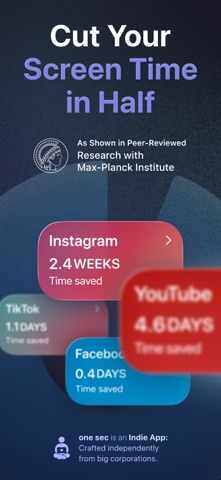


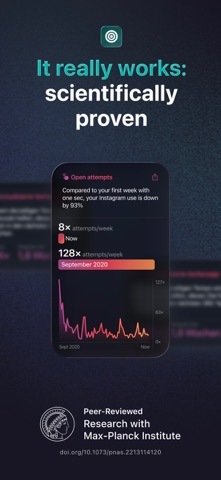
Launched in late 2020 and still actively updated as of July 2026, one sec intercepts the launch of any app you designate and inserts a mandatory breathing pause before granting access. The approach draws on research conducted with the Max-Planck Institute and cites a 57 percent average drop in target-app usage. With 23,000 ratings averaging 4.83 stars, the user response closely mirrors what the science predicts.
Pause screen delays reflex scrolling
Rather than presenting a wall you can dismiss in two taps, one sec intercepts an app launch and holds you on a brief pause screen before continuing. That single speed bump breaks the reflex arc that makes compulsive scrolling so automatic. Because access is delayed rather than denied, there is no frustrating barrier to bulldoze through, which is precisely why the published research points to durable behavior change rather than short-term suppression. The friction principle is not marketing language here; the developer cites partnerships with the Max-Planck Institute and government-funded studies as the foundation. Among the crowded field of screen-time tools, that scientific grounding is a genuine differentiator.
Large footprint, stable across devices
At 267 MB, the install footprint is notably large for a tool whose visible job is displaying an interstitial screen. That size likely reflects animation assets, onboarding flows, and analytics rather than core logic, but it is worth flagging on devices with limited storage. The app depends on iOS Shortcuts automation hooks to intercept launches, which means Apple can inadvertently break the interception with an OS update. Day-to-day, the mechanism has proven stable enough to earn 23,000 ratings at a 4.83 average, suggesting the core loop holds up reliably across a wide range of devices and iOS versions. Update cadence is strong, with version 5.2.7 arriving in July 2026.
Free core feature, unclear paywall
The app is free to download, but the available data does not spell out exactly which features sit behind in-app purchases. That ambiguity is a genuine friction point of a less welcome kind. The free tier appears sufficient to experience the core delay mechanic, and for many users that alone justifies the install. Anyone wanting deeper customization, such as variable pause lengths, detailed usage analytics, or multi-app rule sets, should check the current subscription terms in the App Store before committing. Given the documented behavior-change outcomes, even a paid tier would compare favorably to the cost of most productivity subscriptions.
System-level access requires privacy review
Because one sec intercepts app launches through iOS automation, it operates at a sensitive layer of the operating system. The app's full privacy nutrition label is available directly on its App Store product page, and that is the authoritative place to verify exactly which data types are collected, linked to your identity, or used for tracking. We cannot independently audit what telemetry or analytics the app gathers, so reviewing that label before installing is a reasonable step, particularly if you are concerned about usage-pattern data leaving the device. The 4+ content rating suggests no mature content concerns.
Calm interface, technical onboarding setup
The pause screen itself must be legible and calm by design, since a jarring or cluttered interstitial would undermine the reflective moment the app is trying to create. User reviews at scale suggest the interface lands well on that front. Onboarding relies on Shortcuts configuration, which can feel technical for less experienced iOS users, though the developer has clearly invested in guiding that process given the app's strong ratings. Standard iOS accessibility features, including Dynamic Type and VoiceOver, should function as they would in any well-maintained Swift app, though we recommend verifying VoiceOver compatibility on the pause screen specifically if that is a priority for you.
Six years of steady updates
Version 5.2.7 landed on July 3, 2026, nearly six years after the original September 2020 release. That sustained cadence across a multi-year window is a strong signal that the developer treats this as a living product rather than a side project. Frequent updates also matter practically here, because iOS automation APIs shift with major OS releases and a stale build can stop intercepting launches entirely. The combination of research credibility, a large and satisfied user base, and consistent maintenance puts one sec in a more trustworthy position than most single-developer focus tools.
Pros
- Delay-based friction mechanic is backed by Max-Planck Institute research, not just marketing claims
- Exceptionally strong 4.83 average rating across a large 23,000-review sample signals broad real-world reliability
- Consistently maintained through July 2026, keeping iOS automation hooks current across OS updates
- Addresses compulsive phone habits at the reflex level, making it more effective than willpower-dependent blockers
Cons
- 267 MB install is disproportionately large for a tool whose core job is displaying a pause screen
- In-app purchase structure and feature gating are not clearly disclosed in available store data
- Depends on iOS Shortcuts automation hooks that Apple can inadvertently break with OS updates
Related guides
Similar Tools apps


apptidal is independent and ad-supported. We earn no commission on installs and no company can pay for a better score. How we stay independent.