
Tools · iOS
Otter Transcribe Voice Notes
by Otter.ai, Inc.

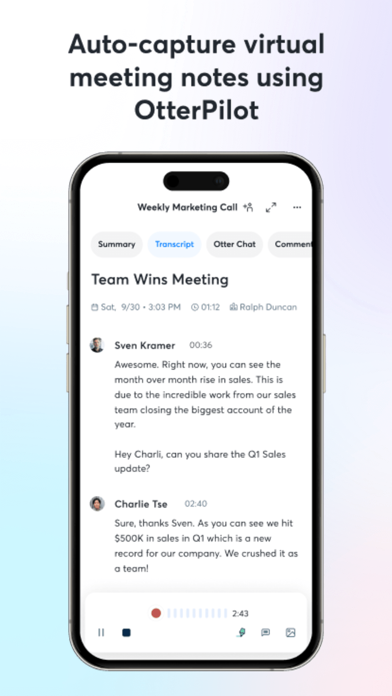


Released in early 2018 and now serving over 10 million users, Otter has grown well beyond basic voice-to-text. The free tier delivers real-time transcription across Zoom, Google Meet, and Microsoft Teams, automatic AI summaries, and a conversational query layer for reviewing transcripts. A 4.76 rating across 66,000 reviews signals strong and sustained user satisfaction. At 246 MB, the install footprint reflects a platform-level tool rather than a lightweight utility.
Live transcription delivers reliably for supported languages
Otter's core promise is live, speaker-labeled transcription, and it largely delivers. Connect it to a Zoom or Google Meet session and captions populate in near real time, with slide capture adding a practical layer for meeting documentation. Beyond raw transcription, the app generates AI summaries and offers a chat interface that lets users query their own transcripts without scrolling through lengthy recordings. Support covers English, Spanish, French, and Japanese, which is a reasonable but still narrow global footprint. Anyone working in other languages will hit a hard stop immediately. For supported languages and clear audio, the accuracy is competitive with anything else available on iOS.
Substantial install size requires device resources
A 246 MB install is substantial, and Otter does run background processes during live meetings, so users on older devices or with limited storage should factor that in. Update recency is a strong positive signal here: the app was last updated in July 2026, and version 3.103.0 suggests a development team that ships frequently. A 4.76 average across 66,000 ratings is a meaningful quality indicator at that volume, pointing to consistent real-world reliability rather than a spike of early enthusiasm. Qualitatively, performance tends to degrade with heavy accents, overlapping speakers, or domain-specific jargon, which is a category-wide limitation rather than an Otter-specific failing.
Free tier sufficient for casual use only
The free tier is a genuinely useful entry point, covering real-time transcription and AI summaries up to monthly usage caps. Those caps are real, however, and regular users who rely on Otter daily for back-to-back meetings will feel the pressure toward a paid plan fairly quickly. Otter Pro and Business tiers unlock higher limits, advanced features, and team collaboration tools. Whether the upgrade cost is justified depends almost entirely on meeting volume. Casual users recording occasional interviews or lectures may find the free tier sufficient indefinitely, while professionals in meeting-heavy roles will likely find the paid tier earns its keep.
Cloud storage raises concerns for sensitive content
Otter requires microphone access to function, and connecting to video conferencing platforms involves granting additional permissions to capture audio from those sessions. The app also stores transcripts in the cloud, which means recorded conversations leave the device. For users handling sensitive discussions, legal matters, or confidential business content, that cloud dependency warrants careful review. We recommend checking the App Store privacy label on Otter's product page directly, as it is the authoritative source for what data is collected, how it is linked to your identity, and what is shared with third parties. Privacy policies can change between app versions, so reviewing the current label before enabling meeting integrations is worthwhile.
Growing feature set creates interface complexity
Otter's interface has grown more complex as the feature set has expanded. The addition of AI Channels, team collaboration tools, and async communication layers means the home screen presents more options than a first-time user expecting a simple recorder will anticipate. That complexity rewards power users who invest time learning the product, but it can feel cluttered for anyone with a narrow use case. On the accessibility front, the app's core output, searchable text transcripts, is inherently screen-reader friendly and benefits users who find audio review difficult. Dynamic Type support and standard iOS accessibility conventions appear to be respected, though users with specific needs should verify current VoiceOver behavior on their device.
Eight years of consistent updates signal commitment
The maintenance record here is genuinely strong. Otter launched in February 2018 and has received consistent updates across eight-plus years, with the most recent update landing in July 2026. Version 3.103.0 reflects a high iteration cadence, and the feature set has expanded substantially since launch, from basic transcription to AI summaries, meeting integrations, and team collaboration tools. That sustained development trajectory is reassuring for users considering a paid subscription, as it suggests the team is actively investing in the product rather than coasting on an established user base. The 66,000 rating count also implies a large enough active user community to surface bugs and drive continued improvement.
Pros
- Real-time transcription integrates reliably with Zoom, Google Meet, and Microsoft Teams
- AI-generated summaries and transcript chat save meaningful time after long meetings
- A 4.76 average across 66,000 reviews reflects sustained real-world reliability at scale
- Frequent updates, with version 3.103.0 released as recently as July 2026, signal active development
Cons
- Language support limited to four languages excludes a large share of global users
- At 246 MB with active background processing, the app is heavy for older or storage-constrained devices
- Free tier usage caps push regular, meeting-heavy users toward paid plans relatively quickly
Related guides
Similar Tools apps


apptidal is independent and ad-supported. We earn no commission on installs and no company can pay for a better score. How we stay independent.