
Tools · iOS
TickTick:To-Do List & Calendar
by Appest Limited
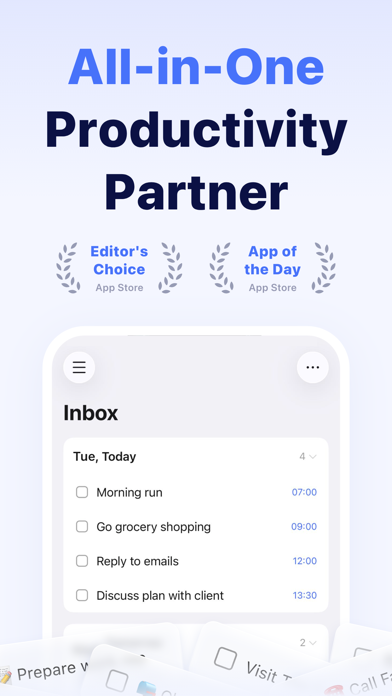


Released in 2013 and still receiving regular updates, TickTick has matured into a serious productivity platform that sits comfortably between a lightweight reminder app and a full project suite. It handles recurring tasks, multiple reminders, calendar views, habit tracking, and a Pomodoro timer without immediately hitting a paywall. At 308 MB the install is substantial, but the feature breadth justifies the footprint for anyone serious about consolidating their productivity tools.
Comprehensive feature set outpaces competitors
TickTick covers the full productivity stack: flexible recurring tasks, multiple reminders per task, priority levels, tags, file attachments, and a built-in calendar view. Email-to-task capture lets you pull work in from yet another context without switching apps, and Siri integration keeps quick capture fast on iOS. Cloud sync across phone, tablet, and desktop works reliably, which is essential when your task list needs to follow you everywhere. The combination of these features in a single, mostly free app is genuinely impressive and outpaces many direct competitors on raw capability.
High user satisfaction reflects polished performance
With a 4.86 rating across 44,000 iOS reviews, user satisfaction is unusually high for a productivity app, where opinions tend to be vocal and divided. The 308 MB install size is notable but reflects a feature set that includes offline support, media attachments, and multiple integrated subsystems. Update cadence is strong, with the latest version dated July 2026, suggesting the development team is actively addressing bugs and adding refinements. Qualitatively, the app feels polished and responsive rather than bloated, though first-time users may need a session or two to orient themselves within the interface.
Free tier sufficient for basics, premium unlocks depth
The free tier is genuinely functional and covers recurring tasks, basic reminders, and list sharing. Power users will eventually encounter ceilings, particularly around calendar integrations, advanced filters, and the number of lists or collaborators allowed. TickTick Premium unlocks those features for a subscription fee that is competitive with alternatives like Todoist or Things 3. For users who only need lightweight list management, the free tier may be entirely sufficient. For anyone wanting the full depth of the platform, the premium tier warrants a trial period before committing.
Cloud sync requires review of privacy practices
TickTick is a cloud-synced service, meaning task data is stored on Appest Limited's servers to enable cross-device access. The app will request access to calendars, reminders, and notifications to deliver its core functionality. For a precise breakdown of data collected and linked to your identity, the App Store privacy label for this app is the authoritative source and should be reviewed before installing, particularly for users who keep sensitive personal or professional information in their task lists. As with any productivity platform, it is worth reviewing what data sync entails under the developer's privacy policy.
Clean interface masks considerable feature density
The interface uses a clean list-based layout with clear visual hierarchy, and the navigation structure is logical once the initial learning curve passes. The feature density is high, which can feel overwhelming for users who only need basic lists, but the design does a reasonable job of surfacing the most common actions. Standard iOS accessibility features such as Dynamic Type and VoiceOver should function within the app, as is typical for well-maintained App Store titles. The calendar and Kanban views add visual flexibility for users who prefer spatial task organization over plain lists.
Continuous development since 2013 signals stability
TickTick has been in continuous development since its 2013 launch, which is a strong signal of platform stability. Version 8.1.20, updated in July 2026, confirms the team is shipping releases regularly rather than letting the app stagnate. A rating count of 44,000 on iOS alone suggests a large and engaged user base, which typically correlates with sustained developer investment. The cross-platform nature of the product, covering iOS, Android, macOS, Windows, and web, also means the development team has strong commercial incentive to keep all clients current and reliable.
Pros
- Multiple reminders per task included on the free tier, a feature many rivals lock behind a paywall
- Built-in Pomodoro timer and habit tracking reduce the need for separate dedicated apps
- Flexible recurring task options handle complex, irregular schedules with ease
- Consistently high 4.86 rating across 44,000 reviews signals reliable real-world performance
Cons
- 308 MB is a heavy install that may give storage-conscious users pause
- Free tier limitations become apparent quickly for power users who need advanced filters or calendar integrations
- Feature density can overwhelm users who only need a simple, lightweight to-do list
Related guides
Similar Tools apps


apptidal is independent and ad-supported. We earn no commission on installs and no company can pay for a better score. How we stay independent.