
Tools · iOS
Yuka - Food & Cosmetic Scanner
by Yuca
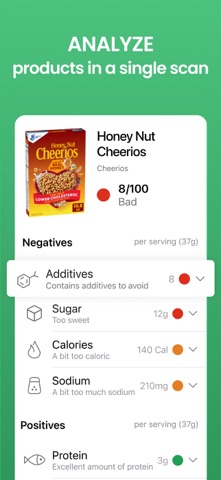


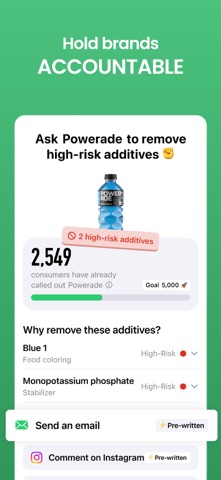

Yuka turns your phone into a pocket health auditor for groceries and personal care items. Point the camera at a barcode and within seconds you get a scored breakdown of what is actually in that product. With a claimed database of 6 million items and 85 million users, the coverage is genuinely impressive. The no-advertising, no-brand-influence model is a rare commitment in this category, and version 5.2 mostly delivers on that promise.
Comprehensive scanning with gaps in niche products
Yuka scans product barcodes and returns a color-coded health score alongside a breakdown of ingredients, additives, and nutritional factors. Food and cosmetics are handled under one roof, which saves juggling multiple apps at the checkout or in the pharmacy aisle. The healthier alternative suggestions are the standout feature, giving you a concrete next step rather than leaving you stranded with a bad score and no direction. The no-advertising, no-brand-influence policy means those recommendations carry real credibility. For mainstream products the scan-to-result loop is fast and accurate, and the database rarely misses a widely distributed item. Niche or regional products are a weaker spot, occasionally returning no results mid-shop, which undercuts the utility exactly when you need it most.
Responsive performance hampered by large install size
A 4.82 rating across 96,000 reviews is a strong signal of consistent, reliable everyday performance. The scanning interface is responsive and the results screen loads quickly on a standard connection. At 204 MB, the install footprint is notably heavy for what is fundamentally a barcode utility, which may give pause on storage-constrained devices. Once installed, however, the app runs smoothly and the camera-based scanning rarely requires multiple attempts on clearly printed barcodes. Offline functionality is limited, so shoppers in areas with poor in-store connectivity may occasionally hit delays. Overall the experience is polished enough that it does not feel like a friction point in a real shopping trip.
Free tier sufficient for casual shoppers
The free tier is genuinely useful and not artificially crippled. Headline scores, basic ingredient flags, and healthier alternative suggestions are all available without paying. The premium tier unlocks deeper analytical detail, including fuller cosmetic ingredient explanations and more granular nutritional data. For casual shoppers the free experience is likely sufficient. Parents managing dietary sensitivities, or anyone who wants to interrogate every scan rather than just act on a top-line score, will find the upgrade worthwhile. The app earns its place as a free download with no hesitation; the premium decision comes down to how deeply you want to engage with the data.
Subscription model reduces data monetization incentives
Yuka's App Store privacy label is the authoritative source for what data is collected and how it is linked to your identity, and we encourage users to review it before downloading. The app's stated business model, subscription revenue rather than advertising, removes the most common incentive to monetize user data through third-party ad networks. Camera access is required for scanning, which is expected. As with any app that builds a profile of your scan history, it is worth checking whether that history is stored locally or synced to Yuka's servers, and what the data-retention policy covers. The absence of advertiser relationships is a meaningful structural privacy advantage over ad-supported competitors.
Intuitive color-coded interface serves multiple user depths
The interface is clean and visually intuitive, using color-coded scoring that communicates risk levels at a glance without requiring users to read dense text. The results screen organizes information in a logical hierarchy, with the overall score prominent and ingredient detail available on a secondary level. That layered approach suits both quick-glance shoppers and detail-oriented users. Standard iOS accessibility features such as Dynamic Type and VoiceOver compatibility are expected on a 4+ rated app with this level of polish, though users with specific accessibility needs should verify support for their workflows. The scoring methodology is publicly documented on Yuka's website, but surfacing that rationale more clearly within the app itself would strengthen trust for first-time users.
Nearly a decade of consistent development and updates
A July 2026 update on an app first released in January 2017 points to nearly a decade of sustained development. Version 5.2 reflects ongoing iteration rather than a product in maintenance mode. The combination of a large and growing user base, 96,000 ratings, and frequent update cadence suggests the development team is actively responding to database gaps, platform changes, and user feedback. Database freshness matters more than almost any other factor for a scanning app, and the evidence here is encouraging. New product additions depend partly on community contributions, which means coverage improves over time as the user base grows.
Pros
- Covers food and cosmetic products in a single app with a claimed 6 million item database
- No advertising and no brand influence on ratings or recommendations, a rare model in this category
- Healthier alternative suggestions provide actionable next steps beyond a simple score
- Consistently strong 4.82 rating across 96,000 reviews signals reliable real-world performance
Cons
- 204 MB install size is heavy for a barcode scanning utility
- Niche and regional products frequently return no results, limiting usefulness mid-shop
- Full ingredient analysis and deeper nutritional detail are gated behind a premium subscription
Related guides
Similar Tools apps


apptidal is independent and ad-supported. We earn no commission on installs and no company can pay for a better score. How we stay independent.