
Tools · iOS
AEBox - Maximize productivity
by AEDISON TECHNOLOGY PTE. LTD.
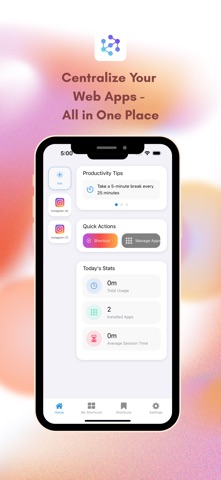
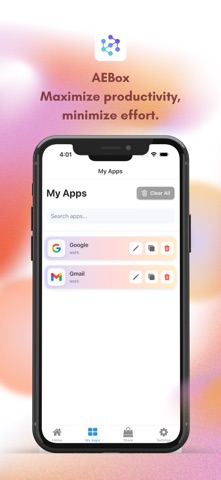

AEBox positions itself as a single, folder-organized hub for managing multiple accounts and reducing browser-tab overload. Launched in March 2025 and already at version 1.1.5 by August, it shows consistent update activity. The 31 MB footprint is modest, the download is free, and the core consolidation idea addresses a real workflow problem. The absence of any public ratings, however, means the app enters this review with no community validation whatsoever.
Multi-account consolidation lacks user validation
The central promise is multi-account access from a single workspace, complemented by custom folder organization designed to reduce context switching. A distraction-free interface framing suggests a deliberately minimal design rather than a sprawling feature set, which can be a genuine advantage for users who want clarity over complexity. For freelancers or small-team operators juggling separate work and personal logins across multiple platforms, that consolidation pitch has real practical merit. Whether the underlying session handling is stable and reliable remains unverifiable at this stage, given the complete absence of user reviews or independent assessments to draw on.
Lean install size offset by high content rating
Qualitative signals offer a mixed picture. The 31 MB install size is lean for a multi-account tool, suggesting the app avoids heavy embedded frameworks and should install quickly on most devices. Five version increments between March and August 2025 indicate the developer is actively addressing issues rather than abandoning the product post-launch. On the other hand, a content rating of 17-plus is unusually high for a productivity utility and may hint at unrestricted web access within the app environment, which could affect both performance expectations and parental controls. Without any user-reported crash data or review commentary, day-to-day stability cannot be confirmed.
Free tier masks unclear monetization strategy
The free entry point removes the financial risk of an initial trial, and the compact size means little storage is sacrificed. That said, the app carries a 17-plus content rating and the store listing does not clearly detail whether premium features sit behind in-app purchases. The existing review data does not specify what, if anything, is monetized beyond the free tier. For a zero-cost experiment with low-stakes accounts, the value proposition is defensible. For users expecting a fully featured, long-term productivity platform, the unclear monetization picture warrants caution before building any serious workflow dependency on it.
Session routing raises unverified credential concerns
This is the area of greatest concern. AEBox asks users to route account sessions through its workspace environment, which means login credentials and browsing activity may pass through or be stored within the app. The App Store privacy nutrition label is the authoritative source for understanding exactly what data is collected, linked to your identity, and used for tracking. Reviewers strongly recommend reading that label in full before installing. The developer, AEDISON TECHNOLOGY PTE. LTD., does not have an established public profile in the productivity space, and no independent security audit or publicly referenced privacy policy was surfaced in the store listing at time of review.
Minimal design likely supports basic accessibility
The app's self-described distraction-free approach implies a clean, low-clutter layout, which tends to benefit users who rely on larger text sizes or simplified navigation. Whether AEBox supports Dynamic Type scaling, VoiceOver compatibility, or other iOS accessibility features is not confirmed in available documentation. Apple's platform guidelines require baseline accessibility compliance, so fundamental support is likely present, but deeper accommodations for users with visual or motor impairments cannot be verified without hands-on testing. The minimal design philosophy, if genuinely implemented, at least avoids the dense visual complexity that often creates accessibility friction in multi-feature productivity apps.
Update frequency suggests active development
On the surface, the maintenance record looks encouraging. Five updates across roughly five months, from launch in March 2025 to the August 2025 build at version 1.1.5, suggest a developer paying attention to the product. That cadence is healthier than many free tools in the same category, which often stall after an initial release. The concern is that update frequency alone does not confirm quality of fixes, roadmap transparency, or responsiveness to user-reported issues. With no reviews, ratings, or community forum activity to cross-reference, the update history is a positive signal but not sufficient evidence of long-term commitment on its own.
Pros
- Free to download with no financial barrier to a first trial
- Lightweight 31 MB footprint installs quickly and conserves device storage
- Multi-account management in one organized workspace addresses a genuine daily workflow pain point
- Five updates in five months demonstrates consistent post-launch development activity
Cons
- Zero ratings and zero reviews provide no real-world reliability or safety signal
- Routing account sessions through an unverified third-party app carries meaningful security risk
- Monetization structure beyond the free tier is not clearly disclosed in the store listing
Related guides
Similar Tools apps


apptidal is independent and ad-supported. We earn no commission on installs and no company can pay for a better score. How we stay independent.