
Tools · iOS
Asana: Work Management
by Asana, Inc.

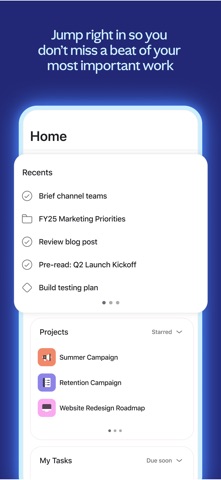


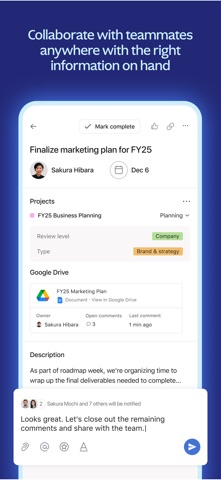

Released in 2011 and now at version 26.27.0, Asana brings list, board, and calendar views to mobile alongside team collaboration, task assignment, and deadline tracking. The 343 MB install is substantial for a productivity utility, but a 4.68 rating across 16,000 reviews signals genuine user satisfaction. Free to download, though advanced features are gated behind paid plans that matter increasingly as team size grows.
Reliable execution across multiple project views
Asana lets individuals and teams create tasks, assign owners, set due dates, and track project progress across multiple views including list, kanban board, and calendar. On mobile, switching between those views is fluid, and the My Tasks screen consolidates every assigned item into a single personal queue, a genuinely practical touch for anyone juggling work across several simultaneous projects. Drag-and-drop prioritization within My Tasks adds a small but meaningful layer of control. The app handles notifications, task comments, file attachments, and project status updates, covering most of what a team member needs to stay unblocked away from a desk. For the scope it attempts, it executes reliably well.
Heavy install with stable performance on current devices
At 343 MB, Asana is one of the heavier installs in the productivity category, where many competitors sit comfortably under 100 MB. That footprint is worth acknowledging on devices with limited storage or older hardware, where background processes could affect battery life. Qualitatively, the high rating volume of 16,000 reviews at 4.68 suggests most users do not encounter persistent crashes or slowdowns on current hardware. The app receives consistent updates, with the most recent arriving in July 2026, which points to active optimization alongside feature work. New users on recent iPhones should expect smooth performance; those on older models may want to monitor resource usage over time.
Free tier functional; advanced features require subscription
Downloading Asana costs nothing, and the free tier is functional enough for small teams or individuals wanting to evaluate the platform. The real calculus shifts once a team needs advanced features such as timeline views, workload management, automation rules, or deeper reporting, all of which sit behind Asana's Premium or Business subscription tiers. For organizations already paying for those plans, the mobile app adds clear value as a zero-extra-cost extension of the desktop experience. Solo users or very small teams may find the free tier sufficient, but anyone expecting the full feature set without a subscription will hit paywalls at meaningful moments.
Processes sensitive business data; review privacy label
Asana is a work management platform, which means it processes task content, project names, user assignments, and potentially file attachments that can include sensitive business information. The specifics of what data is collected, linked to your identity, or used for tracking are detailed in the App Store privacy nutrition label, which is the authoritative source and worth reviewing before deploying the app across a team. Asana as a company publishes a formal privacy policy and maintains enterprise security certifications, which is relevant context for business users. As with any collaboration tool, teams handling confidential data should review both the privacy label and Asana's data processing agreements before onboarding.
Clean interface with stronger web accessibility support
Asana's mobile interface reflects over a decade of iteration, and it shows. Navigation is logically structured, with a bottom tab bar keeping core areas reachable without deep menu diving. The visual hierarchy across list and board views is clean, and color-coded project indicators help users orient quickly across multiple workstreams. The app carries a 4+ content rating, indicating no age-restricted material. For accessibility, iOS Dynamic Type and system-level display settings generally apply across well-maintained App Store apps, though users with specific screen-reader or motor-accessibility needs should test the current version directly, as Asana's accessibility support has historically been stronger on the web than on mobile.
Over a decade of continuous active development
Few productivity apps in the App Store can match Asana's longevity. First released in December 2011 and now at version 26.27.0, the app has accumulated well over a decade of continuous development. The most recent update landed in July 2026, confirming that the mobile client is not a neglected companion piece but an actively maintained product. The high and steadily accumulated review count of 16,000 ratings also suggests an engaged user base rather than a stagnant install base. For teams evaluating long-term platform risk, Asana's update cadence and parent company's public market presence offer meaningful reassurance.
Pros
- Three project views (list, board, calendar) are all accessible on mobile, not just the desktop
- My Tasks consolidates work across every project into a single personal queue for quick triage
- Consistently maintained with a July 2026 update and a version history stretching back to 2011
- A 4.68 rating across 16,000 reviews reflects broad, sustained satisfaction across a large user base
Cons
- 343 MB install size is significantly heavier than most competing productivity utilities on iOS
- Key features including timeline, automation, and workload views require a paid subscription
- The depth and complexity of the interface can feel excessive for users who only need simple personal task tracking
Related guides
Similar Tools apps


apptidal is independent and ad-supported. We earn no commission on installs and no company can pay for a better score. How we stay independent.