
Tools · iOS
Empire - Productivity Manager
by Jamie Kang
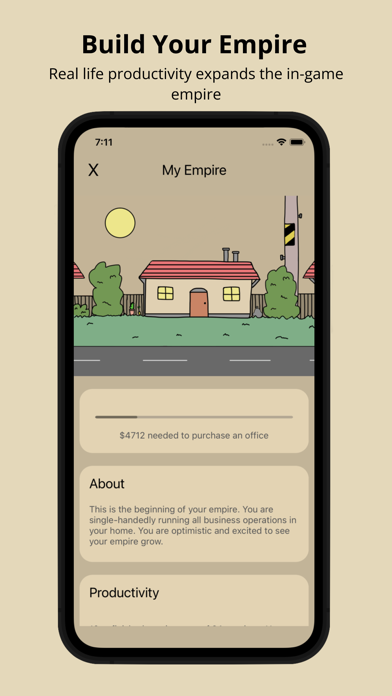


Released in July 2022 by solo developer Jamie Kang, Empire - Productivity Manager pairs scheduled work and break blocks with a gamified consequence system: abandon a work block early and your virtual company takes a hit. At 15 MB and free to download, the barrier to trying it is minimal. With only 13 ratings and no updates since October 2022, however, it remains a small, largely untested release whose long-term viability is genuinely uncertain.
Gamified scheduling with uncertain staying power
Empire's central mechanic is more imaginative than the typical Pomodoro clone. Users build schedules from alternating work and break blocks, and the in-app empire grows or suffers based on whether those blocks are respected. Leaving the app mid-work block carries a visible, if low-stakes, penalty, which gives procrastination a concrete cost that a plain countdown never provides. The scheduling layer is genuinely more flexible than a single repeating timer, letting users design varied daily rhythms. Whether the novelty sustains motivation over weeks rather than days is a real open question, and the thin review base of only 13 ratings cannot yet provide a reliable answer.
Lightweight but frozen since October 2022
A 15 MB install is lean by modern standards, suggesting the app avoids heavy frameworks or large asset libraries, which is a reasonable signal of snappy launch times and modest battery draw. That said, the last update was version 1.7.0 in October 2022, meaning the app has not been optimized for any iOS release since then. As Apple's operating system has moved forward, compatibility and stability risks quietly accumulate for unmaintained apps. The 4.31 average rating across 13 reviews hints at a reasonably smooth early experience, but that sample is too small to draw firm conclusions about crash rates or edge-case behavior.
Free to try with unclear purchase details
Empire is free to download with a content rating of 4 and no stated upfront price, so the financial risk of trying it is zero. The app's store listing does not clearly document whether in-app purchases exist, which leaves some cost transparency questions open. Users should check the App Store product page directly before assuming the full feature set is permanently free. For a casual experiment with gamified focus sessions, the current offering represents reasonable value. Anyone expecting a feature-complete, regularly updated productivity suite will likely find the depth too thin to justify making it a primary workflow tool.
Privacy practices require direct App Store review
We have not independently audited Empire's data practices, and fabricating privacy-label findings would be misleading. The honest approach is to open the app's App Store listing and scroll to the Privacy section, where Apple requires developers to self-report data collection under categories such as usage data, identifiers, and diagnostics. For a solo-developed productivity app of this scale, extensive data collection would be unusual, but verifying that directly in the privacy nutrition label takes only seconds and is always worth doing before granting any permissions the app requests at runtime.
Clean interface without documented accessibility support
Empire's 4+ content rating and focus on scheduling blocks suggest a clean, low-complexity interface aimed at broad audiences. The gamification layer, a visual empire that responds to user behavior, implies some graphical feedback that could aid motivation for users who respond to visual cues. Specific accessibility support, such as Dynamic Type scaling, VoiceOver compatibility, or sufficient color contrast for low-vision users, is not documented in the store listing. Users with accessibility needs should test the app personally or consult the developer before relying on it, as solo projects at this stage often lag behind larger teams on formal accessibility implementation.
Over two years without an update
This is the app's most significant weakness. Version 1.7.0 dropped in October 2022 and nothing has followed, leaving a gap of well over two years without a documented update. For a solo developer project, extended quiet periods are not unusual, but they do raise real questions about whether the app will receive patches for future iOS compatibility issues or respond to user-reported bugs. The 13-rating review count compounds the concern, as low engagement can reduce the feedback signal that motivates continued development. Prospective users should treat Empire as an experiment rather than a long-term productivity foundation until Jamie Kang signals renewed activity.
Pros
- Gamified consequence system gives procrastination a visible cost that plain timers cannot match
- Flexible scheduling with distinct work and break blocks offers more nuance than a single Pomodoro countdown
- Tiny 15 MB install and free download make trying it essentially risk-free
- Approachable concept that lowers the motivational barrier for users who struggle to stay on task
Cons
- No updates since October 2022 creates growing compatibility and reliability concerns as iOS evolves
- Only 13 ratings makes it nearly impossible to gauge real-world stability or long-term usefulness
- In-app purchase details are not clearly disclosed, leaving full cost transparency unresolved
Related guides
Similar Tools apps


apptidal is independent and ad-supported. We earn no commission on installs and no company can pay for a better score. How we stay independent.