
Tools · iOS
Focus Keeper - Pomodoro Timer
by PIXO Incorporation


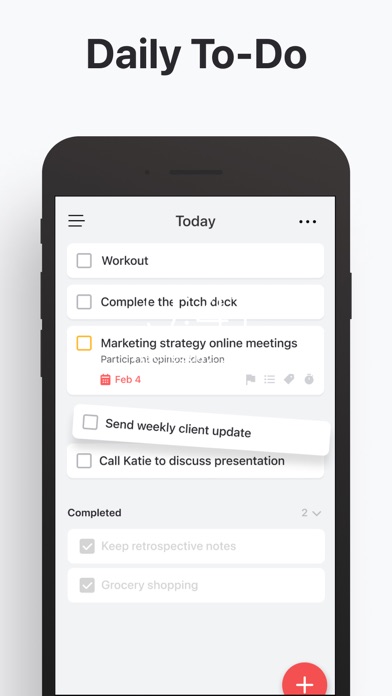


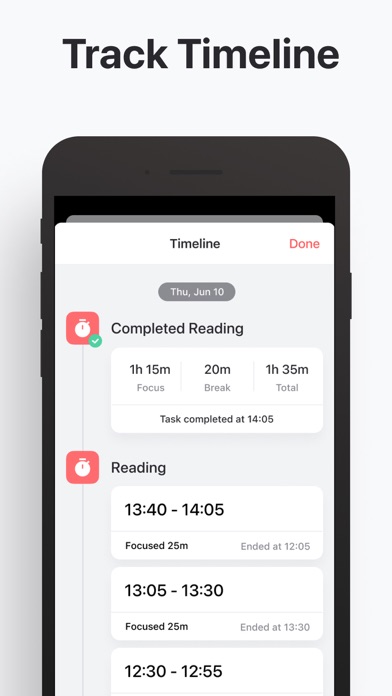
Launched in 2014 and still actively updated through May 2026, Focus Keeper applies the original Pomodoro technique through a clean, customizable timer interface backed by a built-in session tracker. A 4.79 rating across 31,000 reviews on iOS is a credible signal of sustained real-world satisfaction. The app is free to download, though in-app purchases exist. The 871 MB install size remains the most puzzling aspect of an otherwise straightforward productivity tool.
Pomodoro timer with useful session history
Focus Keeper stays faithful to the Pomodoro method rather than overcomplicating it. The default structure follows the classic 25-minute work block paired with a short break, but session lengths are fully adjustable, which matters for users whose concentration windows differ from the textbook interval. A built-in study tracker logs completed sessions over time, transforming a simple countdown into a genuine habit-reinforcement loop. That historical view is genuinely useful: seeing a week of consistent sessions builds momentum in a way a bare timer cannot. The app does not try to be a task manager, and that restraint is a real strength rather than a limitation.
High ratings and recent updates suggest reliability
Qualitative signals here are encouraging. A 4.79 rating drawn from 31,000 reviews suggests the app behaves reliably across a wide range of iOS devices and software versions, with very few users reporting crashes or misbehaving timers. PIXO Incorporation pushed version 4.2.19 in May 2026, confirming the codebase is kept current with Apple platform changes. The 871 MB install size is harder to explain away: productivity timers in this category routinely occupy under 50 MB, so this footprint likely reflects bundled audio packs or visual theme assets. That bulk does not affect runtime speed, but it does consume meaningful device storage before the app even opens.
Free to try, unclear paywall scope
The free entry point removes any financial barrier to trying Focus Keeper, which is a genuine advantage over paid-upfront competitors. However, in-app purchases are present and their scope is not publicly detailed in the available metadata. Users should open the App Store listing directly to review what is gated behind a paywall before committing. If core timer functionality remains free and purchases unlock cosmetic themes or extended analytics, the value proposition is strong. If key features require an upgrade, the calculus changes. The 871 MB storage cost is also a real trade-off on devices with limited capacity, regardless of price.
Privacy details require direct App Store review
No independent privacy audit was conducted for this review, and we do not fabricate findings. The authoritative source for what data Focus Keeper collects, links to your identity, or shares with third parties is the App Store privacy nutrition label on the app's official listing page. Given that the app includes a session tracker and likely notifications, users should expect at minimum usage-data collection. Anyone with heightened privacy concerns, particularly around health or productivity habits being tied to an account, should review that label carefully before downloading. The content rating of 4-plus suggests no age-sensitive material is involved.
Clean timer interface, accessibility untested here
Focus Keeper's interface is built around a single prominent timer face, which reflects sound design thinking for a focus tool: the primary action should always be obvious. Customizable session lengths and visual themes suggest the team has invested in surface-level personalization. Formal accessibility outcomes, such as VoiceOver compatibility or Dynamic Type support, are not independently verifiable here, but Apple's App Store review guidelines require baseline accessibility compliance. Users who rely on screen readers or large-text settings should test the free download briefly before committing, as timer apps vary considerably in how well they surface countdown state to assistive technologies.
Over twelve years of active development
The maintenance record is one of Focus Keeper's clearest strengths. The app launched in May 2014 and received its most recent update in May 2026, representing over twelve years of continuous development from PIXO Incorporation. Reaching version 4.2.19 indicates a steady release cadence rather than occasional bursts of activity. For a productivity tool, that longevity matters practically: it means the app has survived multiple major iOS revisions without being abandoned. The combination of update recency and high rating volume gives reasonable confidence that bug reports are addressed and platform compatibility is maintained proactively.
Pros
- Over twelve years of continuous updates signal genuine long-term developer commitment
- Customizable session lengths let users adapt beyond the default 25-minute Pomodoro block
- Built-in study tracker creates a concrete session history that reinforces the focus habit over time
- A 4.79 rating from 31,000 iOS users provides unusually strong evidence of broad, consistent reliability
Cons
- An 871 MB install footprint is extremely large for a timer app and consumes significant device storage
- In-app purchase scope is undisclosed in available metadata, making the true cost of the full experience unclear
- Strictly Pomodoro-focused design means users wanting integrated task management will need a separate app
Related guides
Similar Tools apps


apptidal is independent and ad-supported. We earn no commission on installs and no company can pay for a better score. How we stay independent.