
Tools · iOS
Focus Timer For Productivity ®
by Fenuku Kekeli

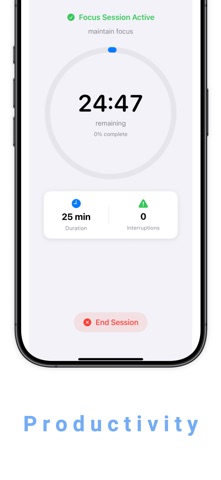
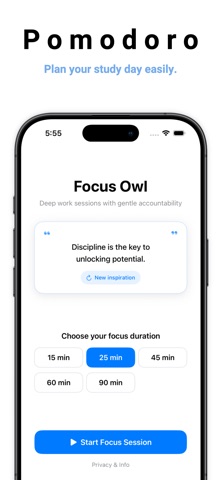

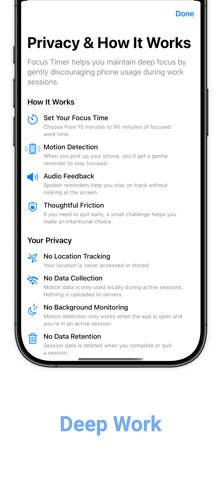
Built by solo developer Fenuku Kekeli, this 9 MB iOS app covers the Pomodoro essentials: adjustable focus and break intervals, streak and goal tracking, focus-time insights, and optional background sounds. It launched in late 2025 and has yet to accumulate a single public rating. Nothing here reinvents the timer wheel, but the deliberately minimal footprint signals a function-first philosophy that some users will genuinely appreciate.
Pomodoro timer with custom intervals and streak tracking
At its core, the app supports both a classic 25/5 Pomodoro rhythm and fully custom interval lengths, which is the most practical differentiator over a bare countdown timer. Streak tracking and time-spent insights create a feedback loop that encourages consistent sessions rather than one-off use. Optional background sounds for concentration are a welcome touch, and the fact that they arrive within a 9 MB package suggests they are lightweight ambient loops rather than a full audio library. The stated design philosophy of removing distractions is coherent and reflected in the interface. That said, the feature set sits squarely in the middle of the category rather than above it, so users arriving from mature competitors may find the depth thinner than expected.
Performance unproven due to zero user ratings
Reliable performance cannot be confirmed from community data because the app carries zero ratings since its September 2025 release. What the available signals do suggest is cautiously positive: a 9 MB install is lean enough to launch quickly and avoid memory pressure on older devices, and the January 2026 update shows the developer is still actively touching the codebase. How the timer behaves under real conditions, whether notifications fire reliably on a locked screen, whether background audio continues uninterrupted during a focus block, and how the app handles interruptions like calls, all remain open questions that only sustained real-world use can answer. Early adopters are effectively the first public test audience.
Free download masks unclear in-app purchase scope
The app is free to download, which removes the financial barrier to trying it. The uncertainty lies in what sits behind any in-app purchases, because the App Store listing does not specify which features are locked or at what price. That vagueness is a genuine concern: users cannot easily budget for the full experience before committing time to the app. Established alternatives like Be Focused Pro carry a known one-time price, while Forest uses a freemium model with clearly communicated limits. Until Focus Timer clarifies its paywall scope, the free entry point is appealing but incomplete as a value proposition.
Check privacy label before granting permissions
No privacy findings are fabricated here. The App Store privacy nutrition label for this app is the authoritative source, and we strongly recommend reviewing it before downloading. A timer app of this type would typically request notification permissions to fire break and session alerts, and possibly access to audio playback for background sounds. It is worth checking whether any usage or analytics data is collected and whether it is linked to your identity. Solo developers sometimes rely on third-party analytics SDKs to understand crashes and retention, so the privacy label is worth a close read given the limited public track record of this release.
Minimal design supports accessibility claims unverified
The app's own marketing emphasizes a minimal, distraction-free interface, and the small binary size supports the idea that the UI is uncluttered rather than feature-dense. A clean design philosophy generally benefits accessibility by reducing visual noise, though we cannot verify specific VoiceOver support, Dynamic Type scaling, or color-contrast compliance without hands-on testing. Users who rely on assistive technologies should check those behaviors early. The 4+ content rating confirms there is nothing objectionable in the experience, and the straightforward single-purpose nature of a timer app typically translates to a shallow learning curve for most users.
Four month update cycle shows modest engagement
Version 1.1 and a roughly four-month gap between the September 2025 release and the January 2026 update suggest modest but real post-launch attention from the developer. One version increment is a thin history, and it does not yet demonstrate a pattern of responding to user feedback, since there are no public reviews to respond to. The update does indicate the app was not abandoned after launch, which is a meaningful baseline for a solo-developer release. Sustained maintenance will depend on whether the app attracts enough users to justify continued investment, making early adoption both a risk and a potential contribution to the app's long-term viability.
Pros
- Tiny 9 MB install minimizes device footprint and suggests fast launch times
- Flexible intervals accommodate both classic Pomodoro rhythms and fully custom session lengths
- Streak and goal tracking adds an accountability layer beyond a simple countdown
- Free entry point and a recent update confirm the app is accessible and still actively touched
Cons
- Zero user ratings provide no real-world reliability or stability signal
- In-app purchase scope is unspecified, leaving the true cost of the full experience unclear
- Version 1.1 with a single update cycle offers limited evidence of iterative polish or bug-fix responsiveness
Related guides
Similar Tools apps


apptidal is independent and ad-supported. We earn no commission on installs and no company can pay for a better score. How we stay independent.