
Tools · iOS
Google Calendar: Get Organized
by Google
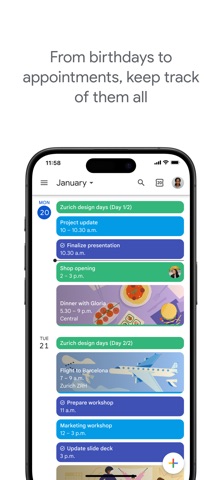

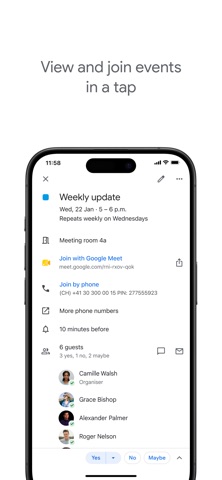

Launched on iOS in 2015 and refined through dozens of updates since, Google Calendar brings deep Google ecosystem integration to iPhone and iPad. At 307 MB it demands real storage, but it rewards that cost with automatic event ingestion from Gmail, seamless layering of iCloud and Exchange calendars, and rock-solid sync across every device you own. For Google-centric users, no competing app comes close.
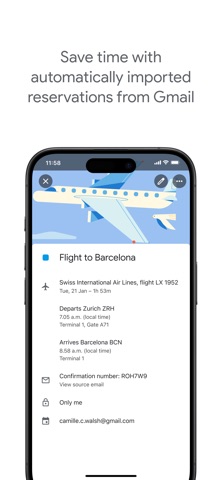
Gmail events automatically populate your calendar
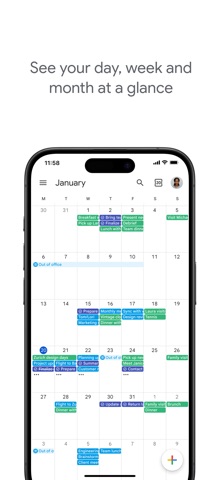
The headline capability is automatic event creation from Gmail. Flight confirmations, hotel bookings, and restaurant reservations surface in your calendar without a single tap of manual entry, which is genuinely useful for frequent travelers or anyone with a busy inbox. Layering multiple calendar sources, Google, iCloud, and Exchange, into one unified view works reliably and eliminates the need to switch between apps. Quick toggling between month, week, and day views feels fluid, and an Apple Watch companion keeps your agenda visible without reaching for your phone. Tasks integration is present but feels grafted on rather than native, which is a noticeable gap in an otherwise cohesive feature set.
Reliable syncing and smooth performance at scale
With a 4.54 rating across 131,000 reviews, real-world user sentiment points to a stable, dependable experience at scale. The app is not lightweight at 307 MB, which is notably large for a calendar utility, yet that footprint reflects a rich feature set rather than obvious bloat. Sync across iPhone, iPad, Apple Watch, and the desktop browser is consistently fast by category standards. Event rendering across multiple overlapping calendars remains clean even when schedules are dense. No independently verified benchmark data is available, so performance claims beyond what user ratings and category norms support are deliberately avoided here. On modern iPhones the app launches quickly and scrolling through views is smooth.
Free for personal use, no hidden costs
Google Calendar is free to download and free to use, which makes it hard to argue against on price alone. The app listing does flag the possibility of in-app purchases, yet no specific purchase tiers are publicly documented, leaving a small transparency gap. For personal Gmail users the full feature set is available at no charge. Google Workspace subscribers access the same app as part of their existing subscription. The only real cost is indirect: the app is tightly coupled to Google's infrastructure, so users are trading data for convenience. For anyone already paying for Google One or Workspace, this is simply a free bonus client with no additional outlay required.
Google account required, data flows through Google servers
Google Calendar requires a Google account to function, which means calendar data, and by extension Gmail event data, flows through Google's servers. That is a meaningful privacy consideration for anyone cautious about Google's data practices. The App Store privacy nutrition label for this app is the authoritative source for exactly which data types are collected and how they are linked to your identity, and we encourage readers to review it directly before installing. Typical permissions for a calendar app include contacts access for invitee lookup and notifications for reminders. The Gmail event-detection feature, while convenient, inherently involves Google parsing email content, a trade-off users should consciously accept rather than overlook.
Material Design interface with standard accessibility support
The interface follows Material Design conventions adapted thoughtfully for iOS, with clear typography, color-coded calendars, and a bottom navigation bar that keeps core views within easy reach. The month, week, and day views are visually distinct and switch without jarring transitions. Standard iOS accessibility features including Dynamic Type and VoiceOver are supported, which is expected of any major Google app, though the depth of VoiceOver optimization across every screen is best verified by individual users with specific needs. The Apple Watch complication and companion app extend usability meaningfully. Color-coding multiple calendars is intuitive, though users with color vision deficiencies may want to verify that their chosen palette remains distinguishable.
Consistently updated since 2015 with active maintenance
Active maintenance is one of Google Calendar's clearest strengths. The app was most recently updated on July 13, 2026, reaching version 26.26.0, a version number that reflects years of iterative releases rather than sporadic attention. The 2015 launch date combined with that update cadence signals genuine long-term commitment from a developer with the resources to sustain it. A rating count of 131,000 on iOS alone demonstrates a large, engaged user base that provides ongoing feedback. Bug fixes, compatibility updates for new iOS versions, and periodic feature additions have all arrived consistently. For users who have been burned by abandoned productivity apps, this track record is genuinely reassuring.
Pros
- Automatic Gmail event ingestion eliminates manual entry for flights, hotels, and reservations
- Reliably layers Google, iCloud, and Exchange calendars in a single unified view
- Actively maintained with a July 2026 update at version 26.26.0, showing sustained developer commitment
- Strong 4.54 rating across 131,000 reviews reflects consistent real-world satisfaction at scale
Cons
- 307 MB install size is disproportionately large for a calendar utility, straining limited-storage devices
- A Google account is mandatory, making it a poor fit for users who want a pure iCloud or Exchange client
- Tasks integration feels secondary and underdeveloped compared to the polished calendar core
Related guides
Similar Tools apps


apptidal is independent and ad-supported. We earn no commission on installs and no company can pay for a better score. How we stay independent.