
Tools · iOS
Google Keep - Notes and lists
by Google


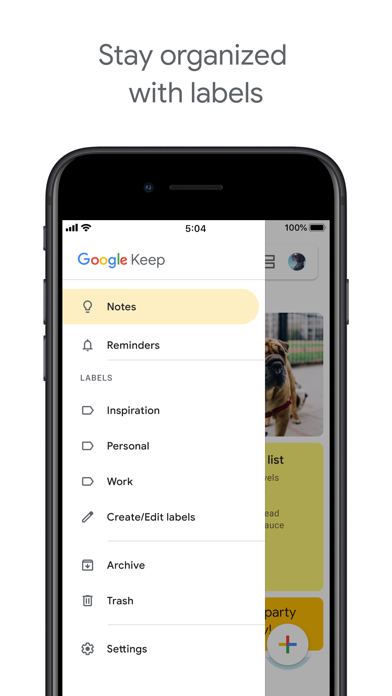

Released in 2015 and still receiving regular updates, Google Keep holds a strong 4.59 rating across roughly 29,000 iOS reviews. It covers quick capture through typed notes, voice memos with auto-transcription, and photos with extractable text. Labels, color coding, and both time-based and location-based reminders round out a feature set that punches well above its zero-dollar price tag, even if the 195 MB install feels heavier than the app's relative simplicity warrants.
Voice transcription and OCR deliver on quick capture
Keep's core promise is frictionless capture, and it largely delivers. Voice memos are transcribed quickly and with solid accuracy, while the image OCR feature lets you photograph a handwritten list or whiteboard and have that text become fully searchable later. That combination alone saves meaningful time in everyday scenarios. Location-based reminders surface a grocery list the moment you pull into a parking lot rather than firing off at an arbitrary hour. Shared checklists sync in real time across collaborators with no setup friction, making split-household errands genuinely manageable. The feature set is intentionally lean, which is both its strength for quick capture and its ceiling for anyone expecting a full-featured note management system.
Large footprint masks otherwise consistent performance
A 195 MB footprint is notably large for a notes utility, sitting heavier than several competing apps in the same category. That said, the app's 4.59 user rating across 29,000 reviews suggests most people do not experience the kind of persistent crashes or slowdowns that would drag a score down. Cross-device sync within the Google ecosystem is genuinely seamless, with changes appearing across Android, iOS, and the web without manual intervention. The card-based interface loads quickly on modern hardware. Performance qualitatively feels consistent with a well-maintained Google product, and the July 2026 update confirms the team is actively addressing issues rather than letting the app stagnate.
Free tier works best within Google ecosystem
Keep is entirely free with no paywalled core features, no subscription tier, and no in-app purchases gating the transcription or OCR tools. For users already inside the Google ecosystem, the value proposition is exceptional. Gmail integration, Google Docs handoffs, and Google Calendar tie-ins all work without extra configuration. For users outside that ecosystem, the calculus shifts. The app's organizational ceiling is low, and if you are not benefiting from those Google integrations, competing free apps such as Apple Notes or Microsoft OneNote may offer more structural flexibility at the same price of zero dollars.
Server storage ties privacy to Google practices
As a Google product, Keep stores notes on Google's servers and ties data to your Google account, which means the same data practices that govern Gmail and Drive apply here. The app's content rating is 4-plus, indicating no mature content concerns. For a precise breakdown of what data is collected and how it is linked to your identity, the App Store privacy label on Keep's product page is the authoritative source and worth reviewing before signing in. Users who are already comfortable with Google's broader data practices will find nothing surprising here, while privacy-conscious users should weigh that ecosystem dependency carefully.
Clean design prioritizes speed over organization depth
The card-based masonry grid is visually clean and color coding provides a fast at-a-glance organizational layer without requiring any deliberate setup. Switching between grid and list views is straightforward. The interface follows Google's Material Design language, which feels consistent across platforms. Standard iOS accessibility features such as Dynamic Type and VoiceOver should function as expected given Apple's platform requirements, though users with specific accessibility needs should test their own workflows. The design philosophy prioritizes speed of capture over depth of organization, which means the interface feels intuitive for light use but can appear cluttered once a note library grows into the hundreds.
Weekly updates confirm active development since 2015
Version 2.2026.28100, updated in July 2026, confirms that Google is shipping releases on a frequent cadence rather than leaving the app to drift. The version numbering itself reflects weekly or near-weekly build cycles, which is typical of Google's mobile products. Having been on the App Store since September 2015, Keep has more than a decade of iterative refinement behind it. The high rating volume of 29,000 reviews on iOS alone suggests a substantial active user base, which typically incentivizes continued investment. There is no indication of abandonment risk here, and the app's deep integration with Google Workspace gives it additional organizational staying power.
Pros
- Voice memo auto-transcription is fast and accurate with no extra setup required
- Image OCR makes photographed text fully searchable, covering whiteboards and handwritten notes
- Location and time reminders are reliable and genuinely contextual in daily use
- Completely free with no paywalled features and seamless Google ecosystem integration
Cons
- At 195 MB, the install size is disproportionately large for a notes utility
- No folder nesting, sub-label hierarchy, or rich text formatting for complex organization
- Value drops considerably for users who are not already invested in the Google ecosystem
Related guides
Similar Tools apps


apptidal is independent and ad-supported. We earn no commission on installs and no company can pay for a better score. How we stay independent.