
Tools · iOS
Microsoft 365 Copilot
by Microsoft Corporation
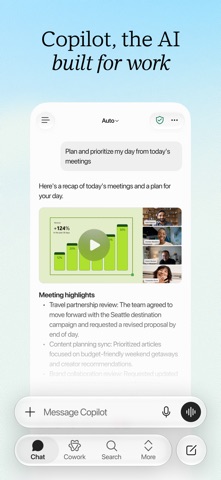


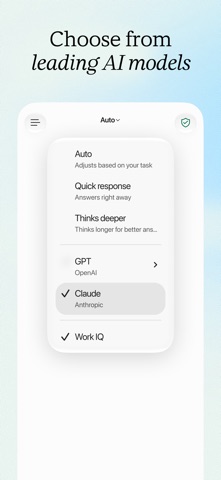


Microsoft 365 Copilot bundles AI chat, voice interaction, unified file search, and built-in agents like Researcher and Analyst into a single free iOS app. At 402 MB it is a substantial install, yet 1.3 million ratings averaging 4.71 stars confirm it has found a loyal audience. The core promise is simple: one place to draft, summarize, locate files, and brainstorm on the go, without toggling between separate Microsoft apps.
Consolidates Microsoft 365 workflows with strong natural-language search
The app consolidates several AI-powered workflows that would otherwise require jumping between Word, Outlook, Teams, and SharePoint. Natural-language file search is the quiet standout, letting users surface a deck edited two days ago or a spreadsheet buried in an email thread with a single conversational query. Voice interaction supports hands-free brainstorming, which is genuinely useful for commuters or anyone stepping away from a keyboard. The Researcher and Analyst agents add structured, multi-step AI work that goes well beyond simple chat prompts. For subscribers already living inside the Microsoft 365 ecosystem, the app delivers on its pitch with notable consistency.
Stable performance backed by 4.71 million user ratings
Qualitative signals here are encouraging. A 4.71 average across 1.3 million ratings is a strong indicator of real-world stability, not just launch-day enthusiasm. The 402 MB install size is on the heavier end for a productivity tool, suggesting a rich embedded runtime rather than a thin web wrapper, which typically correlates with more responsive offline or low-connectivity behavior. Version 2.112, updated as recently as July 2026, points to a team actively addressing bugs and shipping features. The trade-off is that frequent updates can shift interface elements between sessions, creating minor friction for users who rely on muscle memory to move quickly.
Requires Microsoft 365 subscription despite free download
The app is free to download, but that framing is misleading. Almost every capability worth having, including Copilot chat, file search across Microsoft 365, and the Researcher and Analyst agents, requires an active Microsoft 365 subscription. Personal and Family plans include Copilot at no extra charge, while some enterprise tiers require a separate Copilot license. For paying subscribers, the mobile app adds genuine value by reducing context switching without an additional fee. For anyone outside that ecosystem, the free download quickly becomes a gateway to paywalled features, and the subscription dependency is not prominently disclosed in the store listing.
Indexes broad account data across email and documents
Because we do not fabricate privacy-label findings, we direct readers to the App Store privacy section for this listing, where Apple requires Microsoft to disclose exactly which data types are collected and whether they are linked to your identity. Given that the app indexes emails, documents, and calendar data across your Microsoft 365 account, the data footprint is inherently broad. Users in regulated industries should review their organization's Microsoft data-processing agreements before connecting corporate accounts. The app carries a content rating of 12 and above, which imposes no special restrictions but is worth noting for school deployments.
Fluent Design interface prioritizes productivity over simplicity
The interface follows Microsoft's Fluent Design language, which means it shares visual conventions with other Microsoft mobile apps and should feel familiar to existing users. Navigation is organized around a persistent bottom bar, keeping core functions reachable without deep menu diving. The app supports Dynamic Type for text scaling, a baseline expectation on iOS that Microsoft generally meets across its portfolio. VoiceOver compatibility is not something we can independently verify without hands-on testing, but Microsoft publishes accessibility conformance reports for its products, and those are the appropriate reference for users with assistive-technology needs. Overall, the design prioritizes productivity density over simplicity.
Continuous updates since 2013 with weekly release cadence
Maintenance signals are strong across every available metric. The app launched in June 2013 and has been updated continuously since, with version 2.112 landing in July 2026, indicating a release cadence measured in weeks rather than months. A 1.3 million rating count accumulated over more than a decade reflects sustained user engagement, not a spike around a single launch moment. Microsoft's broader investment in Copilot as a flagship product line also provides structural motivation to keep the mobile app current. The main caveat is that rapid iteration occasionally introduces interface changes that catch regular users off guard, a minor but recurring friction point noted across reviews.
Pros
- Natural-language file search spans documents, emails, and recent files across the full Microsoft 365 graph in one query
- Voice interaction enables hands-free brainstorming and meeting prep, a practical differentiator for commuters
- Built-in Researcher and Analyst agents support structured, multi-step AI tasks beyond basic chat
- A 4.71 average across 1.3 million ratings signals genuine, sustained user satisfaction at scale
Cons
- Nearly all meaningful features require a paid Microsoft 365 subscription that is not prominently disclosed upfront
- At 402 MB the install footprint is large relative to what most users will experience as an AI chat and search interface
- Frequent version updates, while a sign of active development, can shift the UI unexpectedly between sessions
Related guides
Similar Tools apps


apptidal is independent and ad-supported. We earn no commission on installs and no company can pay for a better score. How we stay independent.