Tools · iOS
Productivity - Daily Planner
by Success Wizard, Inc.




Released in July 2013 and updated as recently as June 2025, this planner has outlasted dozens of flashier rivals across twelve years on the App Store. Version 8.4.3 bundles weekly objectives, daily routines, personal action plans, and time tracking into one cohesive package. A 4.7 rating from roughly 2,000 reviewers signals a loyal core audience, though that sample size is modest enough to temper expectations before committing.
Structured hierarchy helps self-organizers but demands longer setup
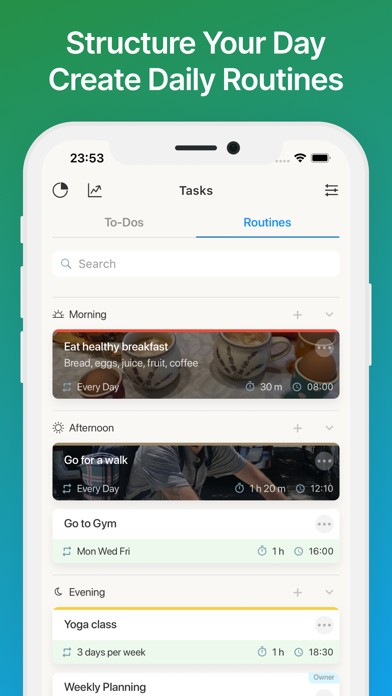
Rather than handing users a blank canvas, this app layers a structured planning hierarchy across weekly objectives, morning routines, and personal action plans as distinct tiers rather than a single flat task list. That scaffolding draws clearly from GTD principles and can genuinely help people who struggle to self-organize from scratch. The combination of routine building, goal setting, and task management in one place removes the need to juggle three separate apps. The tradeoff is that onboarding takes noticeably longer than a minimalist competitor would require, and users who already operate a trusted productivity system may find the imposed structure redundant rather than empowering.
Heavy footprint stable across 2,000 reviews since June
Qualitative signals here are reasonably encouraging. A 4.7 store rating held across 2,000 reviews suggests the app does not frustrate users with chronic crashes or data loss, and the June 2025 update indicates the developer is still actively addressing issues. The 195 MB install size is on the heavier end for a planner category app, where many competitors sit well under 100 MB, so expect a longer initial download and a modest ongoing storage claim. No widely reported performance disasters appear in the public record, but the feature density means older or storage-constrained devices may notice the footprint more than newer hardware would.
Free tier hides true cost behind opaque purchases
The free entry point is a genuine advantage, lowering the barrier to exploring the full framework before spending anything. The complication is that the App Store listing flags in-app purchases without itemizing them, so the real cost of unlocking the complete feature set remains opaque until you are already inside the app. That ambiguity is a meaningful concern for anyone evaluating long-term value. Prospective users should check the current purchase screen carefully on first launch and weigh whether the unlocked tier justifies the spend compared to well-known paid alternatives in the productivity space.
Privacy practices require direct App Store label review
No specific privacy-label findings are available to us from the data provided, so we will not invent any. The authoritative source for this app's data practices is the Privacy section on its App Store product page, where Apple requires developers to disclose data collected, data linked to you, and data used to track you. Before committing to a daily planning habit, it is worth reviewing that label directly, paying particular attention to whether usage data or identifiers are shared with third parties, which is common in free, ad-supported productivity tools.
Clear visual tiers aid navigation in dense interface
The layout is described as user-friendly, and the structured tier system does impose a readable visual hierarchy that separates goals, routines, and tasks clearly. That organization helps orientation inside a feature-dense app. The 4+ content rating confirms nothing objectionable in the interface. Formal accessibility findings, such as Dynamic Type support, VoiceOver compatibility, or color-contrast compliance, are not something we can verify without hands-on testing, but iOS apps that have been actively maintained for twelve years and receive regular updates tend to benefit from Apple's evolving accessibility frameworks over time. Users with specific accessibility needs should test the free version before relying on it.
Twelve years of updates confirm genuine product commitment
By any reasonable measure, yes. A July 2013 release date reaching version 8.4.3 with a confirmed June 2025 update represents genuine staying power in a category where many apps are abandoned within two or three years. Consistent versioning over twelve years suggests the developer, Success Wizard, Inc., treats this as an ongoing product rather than a one-time release. The relatively modest review count of 2,000 for a twelve-year-old app does raise a mild question about growth trajectory, but it does not undermine the maintenance record. Users can reasonably expect continued support in the near term.
Pros
- Twelve-year track record with a confirmed June 2025 update signals genuine long-term commitment
- GTD-influenced layered structure combines goal setting, routines, and task management in one app
- Free entry point lets users explore the full framework before spending anything
- A 4.7 rating across 2,000 reviews suggests reliable day-to-day stability without chronic crashes
Cons
- 195 MB install size is notably heavy for the planner category, where many rivals sit under 100 MB
- In-app purchases are listed but not itemized, leaving the true cost of full access opaque until you are inside
- 2,000 ratings over twelve years is a thin review base that limits confidence in the rating's representativeness
Related guides
Similar Tools apps


apptidal is independent and ad-supported. We earn no commission on installs and no company can pay for a better score. How we stay independent.