
Tools · iOS
Todoist: To Do List & Calendar
by Doist Inc.


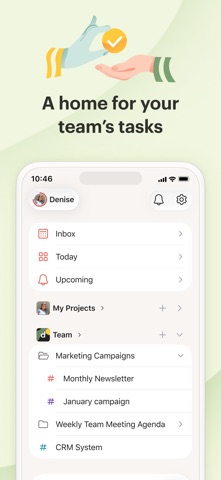


Released in 2012 and now claiming 50 million users, Todoist has accumulated a 4.8-star rating across 127,000 App Store reviews, a figure that reflects longevity rather than a launch-week spike. At 322 MB it is not a lean install, but that footprint funds a feature set capable of handling a grocery list and a cross-team project without forcing a context switch. The free tier exists; the full experience costs extra.
Natural language parsing sets Todoist apart
Todoist is a task and project manager built around fast capture and flexible organization. Its natural language input is the genuine standout: type or dictate something like 'Call client every Tuesday at 9am high priority' and the app correctly parses the recurrence, time, and priority without extra taps. Quick Add reinforces that same low-friction philosophy, keeping the path from stray thought to logged task as short as possible. Projects, sections, labels, and filters then let that captured task live in a structure that scales from a solo grocery list to a shared team backlog. The feature set is broad enough to handle real complexity, which is both the appeal and the occasional source of overwhelm for lighter users.
Stable performance across 127,000 user ratings
A 4.8-star average across 127,000 ratings is a strong qualitative signal for stability, especially for an app that has been in active use since 2012. The 322 MB install is on the heavier side for a productivity tool, suggesting rich local assets and possibly cached data rather than a purely server-dependent architecture, though users on unreliable connections should verify offline behavior independently before committing a critical workflow to the app. Update cadence is genuinely impressive: version 26.7.9 landed in July 2026, reflecting a team that ships regularly rather than letting the app stagnate. Day-to-day, the interface responds quickly and the sync across devices is widely praised in user feedback.
Free tier limits access to core features
The app is free to download, and the free tier covers basic task entry, five active projects, and limited file uploads. That is enough to evaluate the core workflow, but meaningful features such as reminders, filters, calendar integration, and collaboration tools sit behind the Pro or Business subscription. For a freelancer or small team that replaces multiple fragmented tools with one well-maintained platform, the subscription cost is easy to justify. Casual users who only need a simple checklist, however, may find the paywall nudges arrive before they have seen enough value to commit. Pricing should be confirmed in the App Store at the time of purchase, as subscription tiers can change.
Cloud sync requires reviewing privacy label
Todoist is a cloud-synced service, which means task data, project names, and collaboration details travel to Doist's servers. The precise scope of data collection, including any data linked to your identity or used for tracking, is detailed in the App Store privacy nutrition label for this specific app. We recommend reviewing that label before signing up, particularly if your task lists contain sensitive professional or personal information. The content rating is 4+, suggesting no flagged mature content in the app itself. As with any productivity platform that stores data remotely, understanding the privacy policy and any regional data-residency commitments is worth the few minutes it takes.
Clean design scales with task complexity
Todoist's interface has matured considerably since its 2012 debut, settling into a clean, typography-forward layout that prioritizes the task list over decorative chrome. Navigation is logical: inbox captures unorganized tasks, projects provide structure, and the Today and Upcoming views surface what actually needs attention. The design holds up under a heavy task load without becoming visually cluttered. On accessibility, the app follows standard iOS conventions that support Dynamic Type and VoiceOver, though users with specific assistive-technology requirements should test the current version directly, as screen-reader compatibility can vary across updates. The 4+ content rating confirms the interface is free of age-restricted material.
Continuous updates since 2012 launch
Active maintenance is one of Todoist's clearest strengths. Version 26.7.9 was released in July 2026, and the version numbering itself suggests a high-frequency release cadence over many years. The app has been updated continuously since its November 2012 launch, a 13-plus year track record that is rare in the productivity category and meaningful for users who plan to build a long-term workflow around a single tool. Doist as a company has a public history of blogging about product decisions and roadmap changes, which adds an additional layer of accountability beyond raw update frequency. For anyone burned by an abandoned app mid-workflow, that history is genuinely reassuring.
Pros
- Natural language task entry parses dates, priorities, and projects in a single typed or spoken phrase
- Version 26.7.9 shipped in July 2026, confirming a consistent and frequent update cadence
- Scales cleanly from solo personal use to small-team collaboration within one interface
- A 4.8-star average across 127,000 reviews reflects stable, long-term user satisfaction rather than a launch spike
Cons
- At 322 MB, the install footprint is notably heavy for a task management app
- Reminders, filters, and collaboration features are locked behind a paid subscription, limiting the free tier's practical usefulness
- The breadth of features and subscription nudges can feel disproportionate for users who only need a simple personal checklist
Related guides
Similar Tools apps


apptidal is independent and ad-supported. We earn no commission on installs and no company can pay for a better score. How we stay independent.